

DevOps breaks down into two types of subjects.
It is a philosophy or a culture that evolves constantly, a bit like agile culture, and it is also a framework (software infrastructure) designed to energize and improve application development, to speed up the availability of new features, software updates or products.
It promotes continuous communication, collaboration, integration, visibility and transparency between application development teams (Dev) and those responsible for IT operations (Ops).
This closer relationship between Dev and Ops is reflected in every phase of the DevOps lifecycle: software planning, coding, development, testing, release, deployment, monitoring operations, all on a continuous basis.
It constantly generates customer feedback, which strengthens the potential for improvement during development, testing and deployment. The accelerated and permanent release of changes or added features is an example of this.
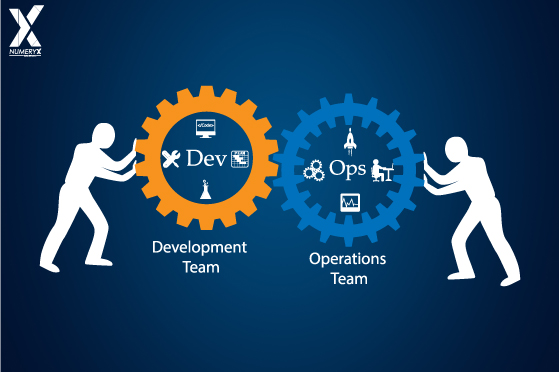
DevOps objectives revolve around four categories:
- culture,
- automation,
- Time To Market
- customer satisfaction.
In each of these areas, DevOps tools improve the streamlining and collaboration of Development AND Operations workflows (or pipelines).
By automating time-consuming tasks, manual tasks, obtaining statistics, the tasks of the different integration phases, tasks related to development, testing, deployment or monitoring, the DevOps approach saves considerable time.
The DevOps approach
DevOps practices improve processes continuously, while automating them. Many of them concern one or more phases of the development cycle:
Development:
By covering the planning and coding phases in the DevOps lifecycle
Continuous testing:
By providing automated, scheduled and continuous tests when writing or updating the application code, which speed up the delivery of code into production.
Continuous integration:
By bringing together configuration management, testing and development tools to track the release of the different portions of code. Continuous integration involves close collaboration between the teams responsible for testing and development to quickly identify and resolve code problems.
Continuous delivery:
By automating the release of code changes after the testing phase, in an intermediate or pre-production environment.
Continuous deployment:
Unlike continuous delivery, continuous deployment consists of automating the release of new or modified code into the production environment. Companies may release code or feature changes several times a day.
Continuous monitoring.
This practice provides for continuous monitoring of the running code and the underlying infrastructure. Developers receive feedback on bugs or problems.
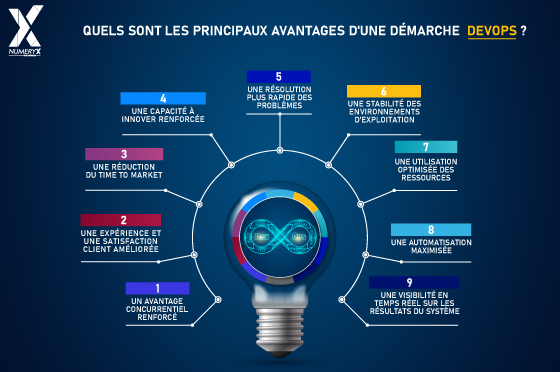
What are the advantages of DevOps?
Three major advantages of DevOps can be identified:
Direct collaboration between Dev and Ops
DevOps fosters an environment where the different teams work together and on common goals. It facilitates collaboration by breaking down the silos between the different teams to encourage them to work together towards a common goal: creating more value for the company. The motivations that lead Dev and Ops to come together are, on the one hand, to pool thinking in the very first phases of work (upstream), and on the other, to improve the operational workflow of a product.
Better collaboration between teams
This naturally leads to complementary training of Ops towards Dev and of Dev towards Ops, in order to coordinate as well as possible on the whole project, and to acquire a similar level of knowledge and technical mastery.
The idea is therefore, in the long run, not to have two half-teams each with one specialization, but really one and the same team doubly specialized in DevOps.
Increased automation of the entire DevOps chain
Pooling Dev & Ops work leads the team to automate the whole chain.
Faster problem resolution and reduced problem complexity
With permanent monitoring and an automated alert system, Dev & Ops can quickly take hold of an incident and work on resolving it almost immediately.
Better visibility on the system’s results
Continuous monitoring makes it possible to track the results of the system being developed continuously.
Improving the customer experience and customer satisfaction
With more frequent releases, the rapid availability of several software versions, features and frequent product updates, while ensuring the level of quality and sometimes also security, DevOps ticks all the boxes for customer satisfaction.
DevOps brings a fast delivery rhythm by making it only one team.
There are fewer revisions to make, there is no more back-and-forth between two teams, no more blaming one side or the other, a complete consideration of the project and of the problems to be addressed… With increased velocity, companies therefore have the opportunity to develop new revenue sources more quickly, notably on customers’ ongoing projects!
Thanks to the reduction in response and request-processing times, companies will be able to have their employees work on higher-value-added activities, which also applies to the customer’s project.
DevOps brings better stability of operating environments:
The DevOps automation approach makes it possible to better cope with human-caused incidents by reducing manual operations thanks to automated release processes
De facto, this makes results more predictable before production releases.
Automation coupled with continuously performed tests makes it possible to deliver software faster, more efficiently, more reliably and with real-time quality of service.
This therefore represents a significant competitive advantage over an organization with two teams instead of just one.
As DevOps offers a differentiated and optimized customer experience, it gives the project a unique character. This “tailor-made” dimension, adjustable with agility, makes it possible not only to win over customers, but also to retain them, and also to win new ones.
This DevOps method pleases customers, and it is a differentiating argument, and a major asset from the very first commercial phases.
The reduction of time to market
One of the advantages of DevOps is that it increases the frequency and speed at which companies can introduce new products to the market, and thus maintain a competitive advantage.
This reduction in time between the emergence of the idea to create a new product and its availability on the market has become a strategic objective for many new-technology-oriented companies.
It goes without saying that the faster a company is at offering new products, the faster it can produce updates and any fixes.
By causal link, the more it improves its products, the more the company will benefit from the commercial value of its products’ features.
The time saved in releasing to production makes deliveries faster
With DevOps, companies streamline processes and improve the efficiency of Dev and Ops.
In this way, companies can spend more time on product and service innovation, while reducing their development costs and operating costs.
DevOps therefore gives a company the ability to keep up with the market faster and with fewer difficulties.
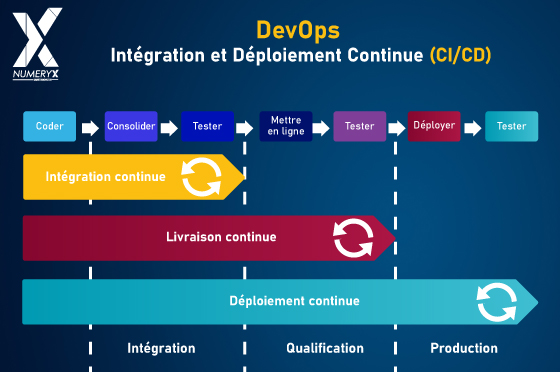
What is the CI/CD process?
The increased automation of the whole DevOps chain relies, among other things, on the combination of Continuous Integration and Continuous Delivery, which is also called the CI/CD pipeline.
CI/CD stands for “Continuous Integration/Continuous Delivery”.
The French equivalent is therefore “Intégration Continue / Livraison Continue”.
CI/CD is a fundamental DevOps process, commonly called the CI/CD pipeline.
This CI/CD process thus groups together two sets of complementary practices, which rely mostly on automation.
The Continuous Integration (CI) process
Developers integrate new code into the main source code daily.
This new code is stored in a central, shared repository, then an automated process will test and validate the changes automatically and continuously.
The goal is to allow developers to quickly identify any problems after each code addition, and to receive immediate alerts in order to make the corrections needed for the software to work properly.
Continuous Integration automates the process of building, packaging and testing code each time a team member commits code changes to version control or management.
With this pipeline, teams therefore have a certain ease in modifying and controlling code, which improves collaboration and application quality.
The Continuous Delivery (CD) process
First of all, do not confuse “Continuous Deployment” with “Continuous Delivery”, which are both acronyms of “CD” in the development world, and in the DevOps chain.
Continuous Delivery, the second part of the CI/CD pipeline, is an extension of continuous integration since it automatically deploys all code changes to a test and/or production environment after the build stage.
This means that in addition to automated tests, you have an automated release process.
The CI/CD pipeline in summary
The main concepts linked to the CI/CD approach are continuous integration, continuous delivery and sometimes, this pipeline also includes continuous deployment (Deploy).
Once grouped together, these two concepts called the “CI/CD pipeline” rely on agile collaboration between development and operations teams.
The CI/CD approach represents a solution to the problems posed by integrating new code into the source code, in a repository shared by development and operations teams.
The CI/CD approach therefore guarantees automation and continuous monitoring throughout the application lifecycle, from the integration and testing phases up to delivery, then during deployment.
Working in tandem, the CI/CD approach brings many advantages:
- consistency and reliability in the software development process,
- stronger collaboration between development and operations teams,
- reduced development costs and time,
- improved application quality,
- improved customer satisfaction.
This CI/CD approach is also compatible with a DevOps dimension integrating a “security” component called DevSecOps.
DevSecOps, or DevOps reinforced by Security
DevSecOps takes the security dimension into account throughout the DevOps chain from software design to delivery of the solution.
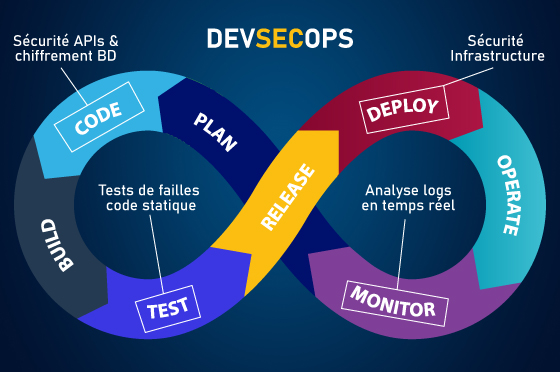
As a result, every participant in the software development cycle is responsible for the security of the solution or product to be delivered.
For developers who focus mainly on meeting deadlines or on functional aspects, security is not always their priority during the DevSecOps lifecycle. DevSecOps is an approach that underlines the need to collaborate continuously with developers while keeping an optimal level of security: in addition to unit and functional tests, the developer must add security unit tests. One of the main characteristics of the DevSecOps approach is the automation of application development phases and the automation of security, which makes it possible to minimize human intervention just like DevOps and to industrialize security checks.
In a DevSecOps approach, there are specific security controls applied at each phase of the project:
- The architecture definition phase (Plan)
With the analysis of the company’s security architecture, it will be determined how applications work and communicate with each other. Following this analysis, companies will be able to set new operational standards and minimum requirements for security tests, and the time frames planned for resolving bugs or problems.
- The design phase (Code)
This step aims to guarantee the security of development and test environments. This requires strict access controls for CI/CD pipelines and additional monitoring, notably for background scripts. Developers must be trained on common threats to best master security during the design phase.
- The development phase (Build)
This is about test automation, for which developers will need secure repositories. When building the code, Static Application Security Testing (SAST) tools will then need to be incorporated to detect code flaws before release to production. With a combination of analysis tools and scripts, it will be possible to make sure developers only work with released versions. Companies should also establish here Interactive Application Security Testing (IAST), a method that can be used to identify runtime weaknesses before code is produced.
- The test phase (Test)
Tests must be launched as early as possible in the software lifecycle to identify bugs in software (before cybercriminals do). These test environments must be controlled permanently to guarantee their effectiveness. The company can here use Dynamic Application Security Testing (DAST) tools to test the application while it is running.
- The pre-deployment phase (Release)
Just before releasing the application, security analysis tools must be used to carry out thorough penetration tests and vulnerability analysis.
In this phase, it is the production environments that will need to be secured against data leaks.
- The deployment phase (Deploy)
After completing the tests during execution, it will then be possible to send a secure version into production for the final deployment.
The last phase consists of letting the individual test bubbles grow in order to determine whether the code that worked before deployment also runs during deployment.
DevSecOps presents a real opportunity in terms of costs, since teams are able to track and detect security problems in the early stages of development. This therefore avoids security spending after the product is released.
What are the advantages of DevSecOps ?
This whole chain can be set up with what is called the DevOps toolchain.
Improved security, with:
- The reduction of application vulnerabilities,
- Help in implementing compliance in the delivery pipeline,
- Maintaining and ensuring compliance,
- The ability to take quick security measures in case of change,
- The identification of vulnerabilities early in the lifecycle of software.
Increased customer satisfaction,
- Competitive advantage,
- Cost reduction.
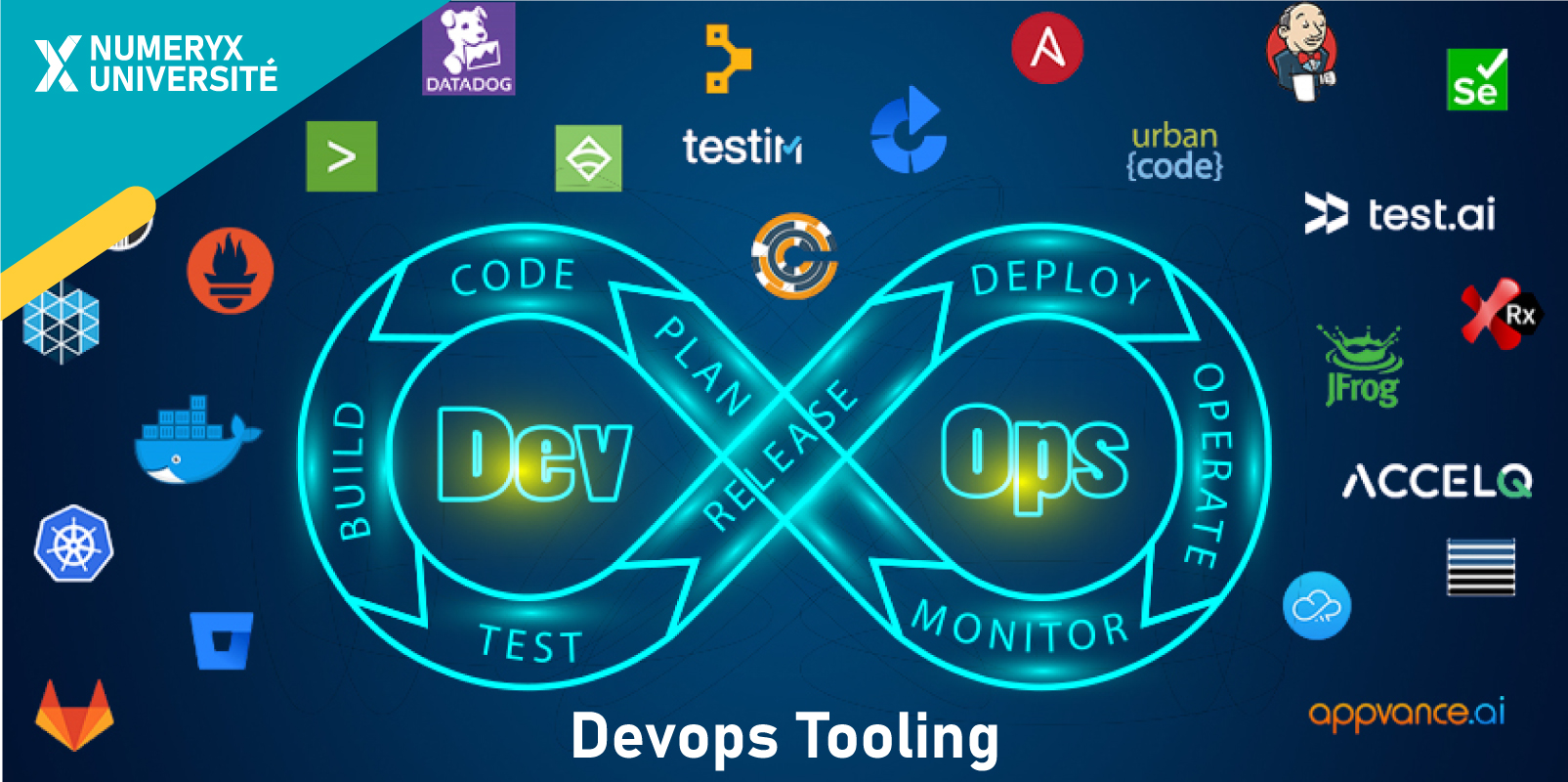
What tools are used in the DevOps chain?
Over time, DevOps is becoming more widespread, and the tools for each link of the DevOps chain are multiplying.
We have therefore listed a set of tools going from the first link of the chain (Plan), to the last link (Monitor), including the security linked to DevSecOps, and the Cloud hosting needed for the whole.
Source code management tools (Code)
SVN:
SVN is a centralized version and source code control tool developed by Apache.
It helps developers maintain different versions of the source code and keep a complete history of all changes.
Git:
Git is a distributed version control system that aims for speed, data integrity, and support for distributed, non-linear workflows. Besides source code management, it can also be used to track changes in any set of files.
Bitbucket:
Bitbucket is a web hosting platform developed by Atlassian. Bitbucket also offers an efficient code review system and keeps track of every change in the code. It can easily be integrated with other DevOps tools like Jenkins, Bamboo.
GitHub:
GitHub is a code hosting platform designed for version control and collaboration. It offers all the distributed version control and source code management (SCM) features of Git in addition to its own features. It offers access control and collaboration features such as bug tracking, feature creation and requests, task management, etc. for the project.
Code building tools (Build)
Maven:
Maven is a powerful project management tool based on POM (project object model), used for building, dependency and documentation of projects. It is a tool that can be used to build and manage any Java-based project. Maven makes the daily work of Java developers easier and helps in building and running any Java-based project.
Gradle:
Gradle is a code build automation tool known for its flexibility in building software. It is used to automate the creation of applications. With Gradle, the build process includes compiling, linking and packaging the code.
GitLab (Auto DevOps):
GitLab is a DevOps platform that allows companies to maximize the overall return of software development by delivering software faster and more efficiently, while strengthening security and compliance.
GitLab CI/CD can automatically build, test, deploy and monitor your applications using Auto-DevOps.
Note that there is a separate GitLab CI and GitLab CD service, respectively for Continuous Integration and Continuous Deployment
Continuous integration (CI) tools
Among the Continuous Integration (CI) tools we find tools related to testing (Test) and tools related to Delivery (Release)
Testing tools (Test)
Selenium:
Selenium is the most popular open source testing tool. It supports test automation across various browsers and operating systems. It can easily be integrated with test management tools like ALM, JIRA and also with other DevOps tools like Jenkins, Teamcity, Bamboo, etc.
Junit:
JUnit is an open source unit testing framework used by developers to write and run repeatable test cases. It supports different test annotations with which any developer can write a transparent unit test case. It can easily be integrated with other DevOps tools like Jenkins, GIT, etc.
Delivery tools (Release)
CircleCI:
CircleCI is available as cloud-based and on-premises solutions for continuous integration. It is easy and fast to get started with and supports lightweight, easily readable YAML configurations.
Travis CI:
Travis CI is a distributed continuous integration platform hosted in the Cloud, used to build and test projects hosted on GitHub and Bitbucket. It is configured by adding a YAML file. It can be tested for free for open source projects and for a fee for a private project.
TeamCity:
TeamCity is a server-based continuous integration and build management tool developed by JetBrains. It has a simple, easy-to-use user interface (UI) and provides build progress, detailed build information and history information for all configurations and projects.
Bamboo:
Bamboo is one of the popular products developed by Atlassian to support seamless continuous integration. Most of its features are predefined, which means we do not need to download different plugins like Jenkins. It also supports seamless integration with other Atlassian products such as JIRA and Bitbucket.
Hudson:
Hudson is free software written in JAVA and runs in a servlet container such as GlassFish and Apache Tomcat. It offers the ability to trigger your automation suite with any change in the corresponding source management system such as GIT, SVN, etc. It also supports all Maven-based and Java projects.
Jenkins:
Jenkins is one of the most popular open source DevOps tools to support continuous integration and delivery via DevOps. It enables continuous integration and continuous delivery of projects, regardless of the platform users work on, using various build and deployment pipelines. Jenkins can be integrated with several testing and deployment tools.
Deployment tools (Deploy)
Docker:
Docker is a tool for creating, deploying and running applications using containers. This container allows the developer to package an application with all the components and sub-components it needs, such as libraries and other dependencies, and ship everything as a single package. This works on the concept of ship and run anywhere.
Kubernetes:
Kubernetes is an open source container orchestration system originally designed by Google and now maintained by the Cloud Native Computing Foundation. It is used to automate the deployment, scaling and management of applications. It works with other container tools, including Docker.
Configuration tools (Operate)
Puppet:
Puppet is an open source configuration management tool used to configure, deploy and manage many servers. This tool supports the concept of infrastructure as code and is written in Ruby DSL. It also supports dynamic scaling up and down of machines as needed.
Chef:
Chef is an open source configuration management tool developed by Opscode using Ruby to manage infrastructure on virtual or physical machines. It also helps manage complex infrastructure on the fly on virtual, physical and cloud machines.
Ansible:
Ansible is an open-source tool for IT configuration management, software provisioning, orchestration and application deployment. It is a simple but powerful tool for automating simple and complex multi-tier IT applications.
SaltStack:
SaltStack is open source software written in python and using the push model to execute commands via the SSH protocol. It supports horizontal and vertical scaling. It supports YAML templates to write all scripts.
Terraform:
Terraform is an open-source tool for creating, modifying, deploying and versioning infrastructure safely and efficiently. It is used to manage existing and popular service providers as well as custom in-house solutions. It helps define infrastructure in configuration / code and will allow a user to rebuild / modify and track infrastructure changes in a simple way.
Continuous delivery (CD) tools
Among the continuous delivery (CD) tools we find tools related to monitoring (Monitor) and tools related to planning (Plan)
Monitoring tools (Monitor)
Nagios:
Nagios is an open source tool and one of the most popular tools for continuous monitoring. Nagios helps monitor systems, applications, services and business processes in a DevOps culture. It alerts users in case of a problem with the infrastructure and also alerts them when the problem has been resolved.
Sensu:
Sensu is an open-source monitoring tool written in Ruby that helps monitor servers, services, applications and cloud infrastructure in a simple and efficient way. It is easy to scale so that we can easily monitor thousands of servers.
Datadog:
Datadog is an agent-based server measurement tool. It supports integration with different web servers, applications and cloud servers. Its dashboard service provides various graphs on real-time monitoring of the infrastructure.
ELK:
ELK is a collection of three open source products – Elasticsearch, Logstash and Kibana, all developed, managed and maintained by the company Elastic. It allows users to access data from any source, in any format, then search, analyze and visualize that data in real time. Grafana: Grafana is an open-source analytics platform to monitor all metrics of infrastructure, applications and hardware devices. You can visualize data, create and share a dashboard, set up alerts and collaborate. You can pull data from more than 30 sources, including Prometheus, InfluxDB, Elasticsearch, AWS CloudWatch, etc.
New Relic:
New Relic is a software analytics product for application performance monitoring (APM) that provides real-time data and trends on web application performance and the level of satisfaction end users experience with it. It supports end-to-end transaction tracing and displays them with a variety of color-coded charts, graphs and reports
Planning (Plan) and collaboration tools
JIRA:
JIRA is one of the popular project management tools developed by Atlassian, used for tracking issues, bugs and projects. It lets the user track the status of the project and of the issue. It can easily be integrated with other Atlassian products like Bitbucket in addition to other DevOps tools like Jenkins.
Slack:
Slack is a freemium cloud-based collaboration tool that enables team communication and collaboration in one place. This tool can also be used to share documents and other information between team members. It can also be easily integrated with other tools such as GIT, Jenkins, JIRA, etc.
Zoom:
Zoom is a web conferencing and instant screen-sharing platform. You can have your team join by audio or video. No matter the size of your team, Zoom is able to host up to 1000 attendees in an online meeting.
Clarizen:
Clarizen is collaborative and project management software that facilitates issue tracking, task management and project portfolio management. It is easy to customize and has a friendly interactive user interface.
Asana:
Asana is a mobile and web application designed to help teams organize, track and manage their work effectively and efficiently. It is used to track the team’s daily tasks and to support messaging and communication throughout the organization.
Continuous security tools (Sec)
Snyk:
Integrate Snyk into the development lifecycle to automatically find and fix open source security vulnerabilities. It supports JS, .Net, PHP, NPM, jQuery, Python, Java, etc. and can be integrated into coding, code management, CI / CI, container and deployment. Snyk has the largest open source vulnerability database.
Netsparker:
Netsparker automatically scans your application for security flaws and provides actionable classified reports so you can act according to priority. A DevOps security scenario would be to review the new commit and report the bug directly in the tracking system like Jira or GitHub and rescan once fixed by the developer. You see it integrate at every stage of the SDLC.
Cloud hosting tools
AWS:
AWS is a web hosting platform created by Amazon that offers flexible, reliable, scalable, easy-to-use and cost-effective solutions. By using this cloud platform, we do not have to worry about setting up an IT infrastructure, which generally takes a reasonable amount of time to set up.
GCP
Google Cloud is a complete set of public cloud hosting and computing services offered by Google. It supports a wide range of services for computing, storage and application development using Google hardware.
Azure:
Azure is a cloud computing platform, designed by Microsoft to build, deploy, test and manage applications and services through a global network of its data centers. The services provided by Microsoft Azure come in the form of PaaS (Platform as a service) and IaaS (Infrastructure as a service).
You probably already know it, DevOps and DevSecOps engineers are highly sought after by companies for all the reasons mentioned in this article.
Numeryx lets you find your DevOps talent through Technical Assistance recognized by our clients from the Industrial, automotive and aeronautics worlds, Cloud Networks & Infrastructure, in the world of cybersecurity applied to IoT, or Embedded Systems.
Need DevOps / DevSecOps training?
With Numeryx University, certified Qualiopi, we can offer on-site or remote training sessions according to your preference and the availability of your resources. Take a look at our catalog of more than 140 courses, or more directly, at the DevOps/DevSecOps training by clicking here
Competitive advantage, Cost reduction. Increased customer satisfaction, Reduction of application vulnerabilities, Help in implementing compliance in the delivery pipeline, Maintaining and ensuring compliance, The ability to take quick security measures in case of change, The identification of vulnerabilities early in the lifecycle of a software.