

Phishing, or “hameçonnage” in French, is the most widely used malicious practice by cybercriminals on the internet. You yourselves, readers of this article, have probably received dozens or even hundreds of fraudulent phishing messages through your private and professional mailboxes, via SMS or through fraudulent phone calls posing as a trusted third party. So, how to protect yourself against phishing?
Through this blog article, we give you a few keys to identify these phishing attempts so as not to fall into the traps set by cyber criminals.
1. Never give out sensitive information by messaging or by phone
You have probably read it in information messages from your bank, a delivery company or social security (Ameli.fr), since all these organizations and many other private and public ones are standing up to the threats of the web.
Any trusted organization will warn you with a message similar to the following: “Our organization never asks you to give out your personal data by phone or by e-mail”.
This information is vital to protect you, and is repeated to you regularly so that you keep in mind never to disclose personal, sensitive or banking information, contrary to these fraudulent processes. What is called “psychological hacking” is more broadly, in the world of IT and cybersecurity, called social engineering.
2. Check the sender’s e-mail address
When you receive an e-mail, you only see the “sender’s name” and not their full e-mail address. In reality, you only see what a hacker wants you to see to put you at ease.
We will therefore see how to find out the real sender of an e-mail with a real case of phishing.
This phishing impersonates the company SHEIN.fr, a very trendy fast-fashion company that cybercriminals are riding on.
You receive an e-mail from SHEIN.fr and you open it. Having doubts about the structure of this e-mail, and because of an offer too good to be true, you decide to check the sender’s address.
To do so, you only have to click on the sender’s name, and you will discover whether their sending address seems correct and legitimate.
If you notice that the address does not match, block it immediately.
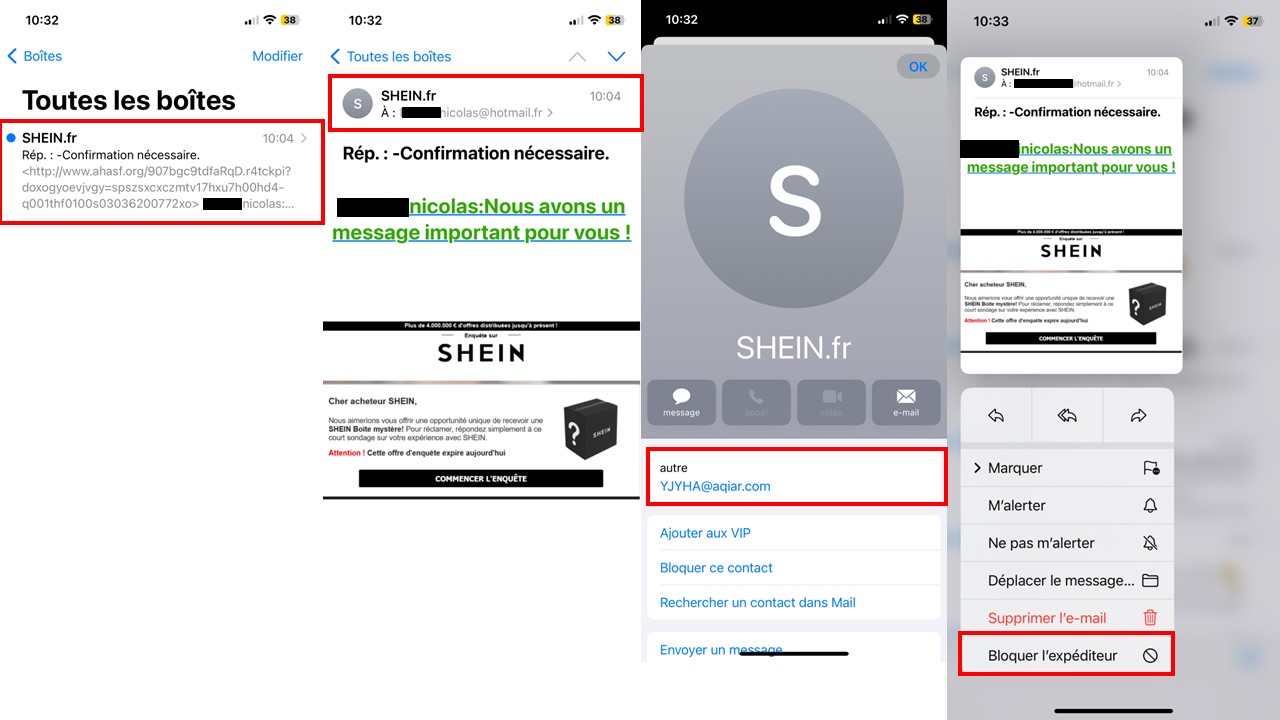
Be careful, hackers know how to use e-mail addresses with a .com or .net extension!
A “zero trust” policy, called “Zero Trust” in professional jargon, must be applied.
An extension, whatever it is, can no longer be a guarantee of security and peace of mind on the internet.
As a reminder: if your contact is called “EntrepriseO”, it must contact you via an e-mail address of the type: firstname.lastname@entrepriseo.com, or departmentname@entrepriseo.com, or at the very least, this address must include the company name.
Examples: franck.dupont@entrepriseo.com or f.dupont@entrepriseo.com or serviceclient@entrepriseo.com
Also beware of e-mail address terminologies that differ from what you are used to seeing, for example: f.dupont@entrepriseo.fun
3. Before clicking on a link, hover over it with your mouse or inspect it with your smartphone without clicking on it!
By inspecting a link via your PC or your phone, you will very quickly notice whether it is a malicious address, as it will be far from resembling a URL that is safe.
Returning to the previous example, we could already get a glimpse of a strange link from the inbox, with a URL beginning in http, followed by a foreign organization name.
In the following visual (the one in the middle), there is also a suspicious address written in small characters whose extension is .fun, which does not match the brand universe of SHEIN.fr.
On the “Start the investigation” button, you can get a preview of the link you are being redirected to by hovering over this button with your mouse, or by keeping your finger pressed on this button from your mobile, as in this example.
You can then copy this address to paste it into your search engine, to give you a precise idea of its construction, and of its authenticity.
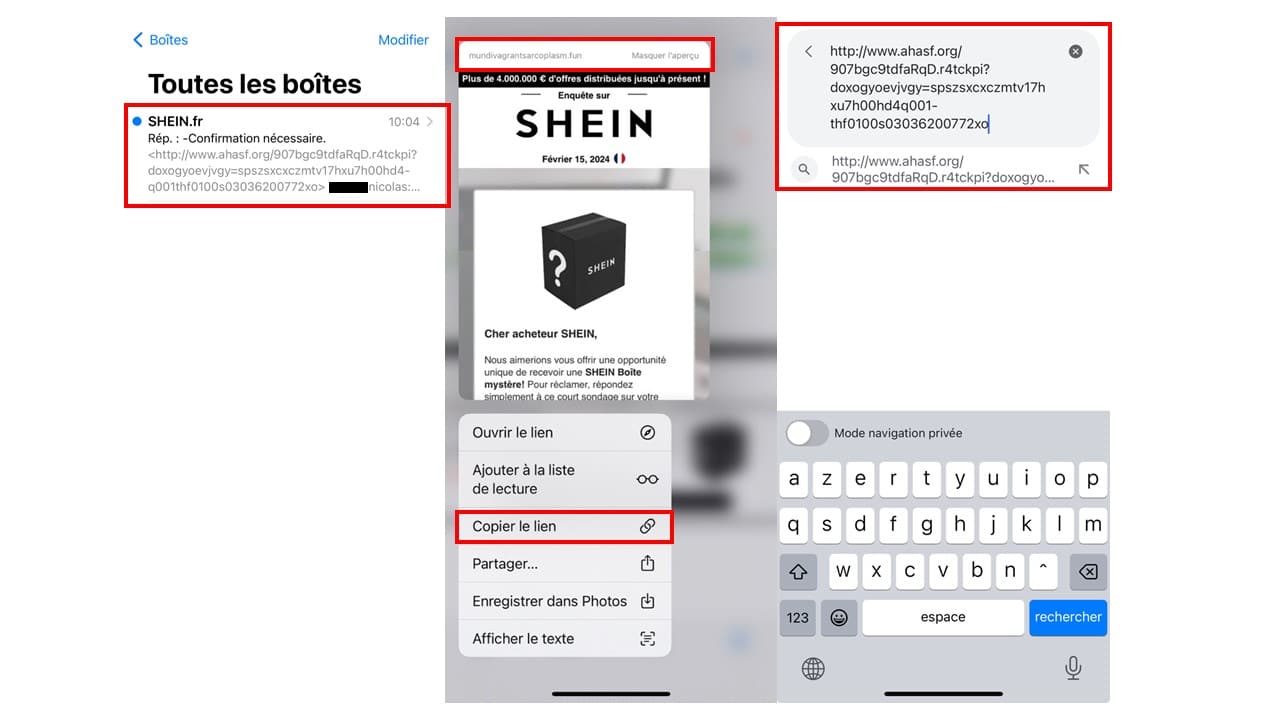
We state once again that this link must not be clicked, and therefore that you must not press “Enter” to obtain a search result, which would take you onto a hacker’s ground.
3. Check the address of the site displayed in your browser.
Through an e-mail falsifying the graphic charters and structure of the mail from your bank, your favorite clothing site or, more broadly, a trusted third party, you will find yourself faced with information that makes you want to click to find out more.
This can be motivated by fear:
– pay your fine within 10 days before it is increased
– settle your overpayment paid by the CAF, or by FranceTravail (formerly pôle-emploi)
– your account has been hacked, change your password immediately
This can be motivated by greed:
– you were drawn by lot, and you are the lucky winner of a trip to Bali!
– €150 credited to your Fnac account for the purchase of your favorite game console!
– you are about to win an entire pallet of products on Temu for only €1!
This can be motivated by a short deadline to act:
– pay your fine within 48 hours or face prosecution,
– only a few hours left to win an electric bike by filling in the following questionnaire.
You can observe here several social engineering techniques that will always push you to find out more, through a link that will then send you to an interface almost identical to the site you are used to visiting.
The goal is always to manipulate you and to extract confidential, personal or banking information from you.
To avoid falling for it, there is a very simple technique which consists of checking the link sent to you either:
– by copying it and pasting it in your internet browser (without launching the search!) so that you realize its real origin
– by using a link checker such as Urlvoid.com or the one offered by Google Transparency Report,
– via the one built into your antivirus, such as those offered by Norton SafeWeb and Kaspersky Threat Intelligence Portal.
– or finally, by downloading a specially dedicated API.
Using a VPN (Virtual Private Network) also gives you an additional level of security in the use of your electronic devices or your use of the internet.
3.1. Check that you are on a secure website whose URL begins with https (and not http)
A site beginning with https has additional security that encrypts your data, and secures the data exchanged between your browser and the server of the site in question. To sum up, your connection is more secure with a site whose URL begins with https whereas it is not with a site whose URL only begins with http.
Be careful, hackers also know how to reproduce https links!
This technique alone is not enough, it must be supplemented with other verification elements from this list to be fully sure of the authenticity of a link.
3.2. Manually enter your site’s address in your browser
The other surest way to make sure you are visiting the right website (with the right link) is to type yourself in the search bar of your browser the name of the site you want to be redirected to.
By proceeding this way, you will eliminate a high probability of clicking on a malicious link, and of falling into a social engineering trap.
Example: when opening an e-mail, you might spontaneously click on the wrong address to go to Amazon, by clicking on the first URL of our example below, rather than on the second which is the right one:
1- https://www.αmαzon.fr/
2- https://www.amazon.fr/
Pay very close attention when reading, on the internet, the devil really is in the details!
4. Scrutinize language mistakes and spelling mistakes
Phishing messages can be well written and it is sometimes difficult to tell the real from the fake by a simple reading. But it often happens that these e-mails are riddled with spelling, syntax and expression mistakes.
Emojis, for example, are not customary for service companies, energy suppliers, administration, especially by e-mail and by SMS.
If you notice that an e-mail contains spelling mistakes and that the language elements are not those you know, then there is a strong probability that this mail does not come from a safe source.
5. If in doubt, contact the organization concerned yourself
There are several types of phishing, among which e-mail is the one most used by hackers. But you need to know about other malicious practices that derive from it, such as phishing by SMS (called Smishing) or phishing by phone (called Vishing).
As with e-mail phishing, these techniques consist of impersonating a trusted third party to make you carry out a transaction.
By SMS, the principle is the same as e-mail phishing but on mobile. For example, you will be sent a message in which you are invited to click on a link, or you will be told that you will be contacted shortly by phone to be told of an extraordinary offer, or to announce that a threat hangs over you and that you can eradicate it with the help of their service.
The goal is the same, but the process is different.
To make sure an e-mail, an SMS or a call is authentic, contact the organization that contacted you yourself through your usual e-mail or phone contacts. They will then be able to guarantee whether the message you received is authentic or not.
6. Use complex and different passwords for each site and application
It is common for a user to get lost among their many passwords. There are those used to log in to their computer, their e-mail address, their Ameli.fr account, their professional logins etc…
So, why complicate things when you can keep it simple, and have the same password for all these tools and devices?!
To protect yourself against phishing, you need to have several passwords and even a different one for each device and each use.
But it is also not a matter of using passwords that are too simple such as: azerty, 0000, 0123, your year of birth or even your city followed by your year of birth.
Because these passwords are very easy for cyberhackers to find, you need robust passwords that comply with at least 10 characters, a lowercase letter, an uppercase letter, a number and a special character.
But if you want to find a robust password by yourself, you can also write an entire sentence, or a 90s-style SMS message, when characters were limited, and when SMS were still paid!
Example of sentence / password: In1998,Zizouwastheking!
Example of 90s SMS / password: iRGHT2p@k2lé (Yesterday, I bought two packs of milk)
To go further, you can generate robust passwords via certain electronic devices such as your smartphones, your search engines, or with online robust password generators such as the one offered by Avast Random Password Generator, or via software such as KeePass, which gives you the possibility of storing all your passwords and generating them in one and the same application.
6.1 Separate your personal and professional uses.
Do not use the same passwords at home and at your employer’s.
The link between your personal and professional activity is very simple for a hacker and for anyone to make with professional social networks. Yet, if you use the same passwords in these two worlds, you will be vulnerable on both sides if you are hacked even once on one of your personal or professional accounts.
7. Check the dates and times of last logins to your account.
Some sites and some applications make it possible to identify the dates, places and times of the last logins made with your user account. This is the case for your Google account, for example. By reviewing your last logins, you will quickly be able to see whether there was an unusual login to your account.
It is sometimes possible for you to activate an e-mail alert for each login made on your user accounts, for even further monitoring.
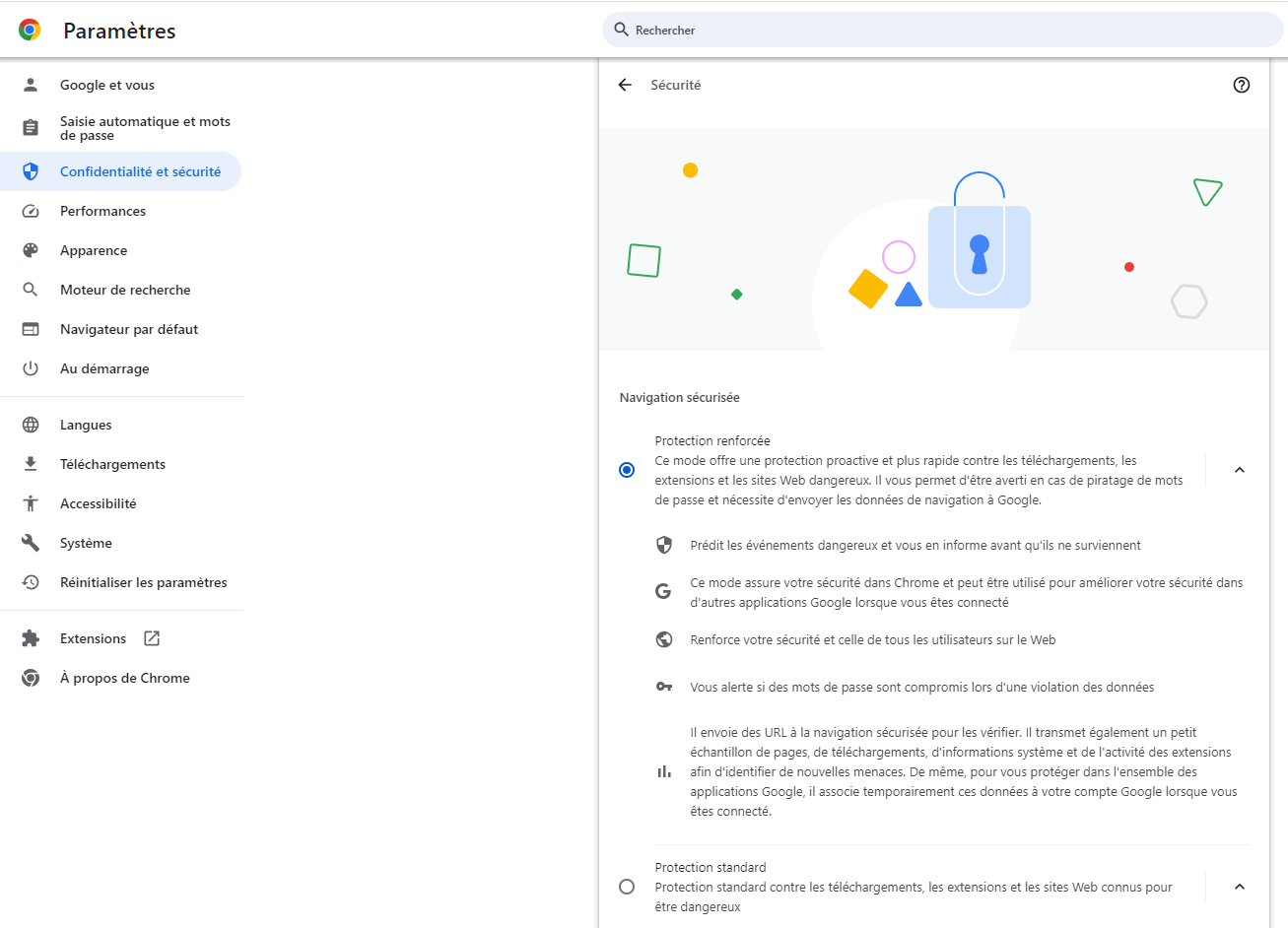
8. Use your internet browser’s anti-phishing filter
Whether you use Google Chrome, Mozilla Firefox or Internet Explorer, you can reinforce the security of your internet browsing. In your browser settings, you will then find a section dedicated to your security settings, in order to filter unsecured links, and therefore phishing.
Spontaneously, we do not necessarily think of protecting ourselves with the tools we have, thinking that these tools are already safe and guarantee a level of protection equal to the trust we place in them, and yet, without our knowing it, our own tools can protect us a little better (and for free).
9. Install anti-spam software
To protect yourself from phishing e-mails, use anti-spam software to identify phishing e-mails and file them directly in your junk mail. The aim is not to expose you, and to limit as much as possible the risk of clicking on or opening a fraudulent e-mail. By doing this sorting, anti-spam software can therefore prevent you from opening malicious links, being exposed to viruses or even inadvertently downloading malicious software.
10. Download your applications only from official sites
Entering a malicious site de facto exposes you to intrusions into your devices or your applications. Avoid downloads infected by malware (malicious software) and malicious spamming by not exposing yourself on unsecured or unofficial platforms.
11. Avoid public or unknown Wi-Fi networks
In a professional and personal context, connecting to a public Wi-Fi network considerably exposes you to an intrusion into your computerized systems and your connected devices.
By public Wi-Fi, we mean a Wi-Fi network open to everyone, and therefore to potential wrongdoers. When connecting to a public Wi-Fi network, there is a strong probability that you will have to enter certain information and click on links in order to connect. This is the gateway to phishing, but not only.
For example, some hackers can embed in these links a malware or spyware (Spyware) that downloads directly onto your device. If you log in to your bank, or if you use your social networks, these accesses could then be corrupted and recorded in software controlled by a malicious third party.
Opt for your 4G or 5G mobile network whenever possible rather than connecting to a public and open network!
12. Information, awareness or training on the risks of the net
If you are already aware of the risks of the net, you will inevitably be less likely to fall into common traps such as phishing, for example. On the other hand, if you have never heard of these fraudulent practices, then you are very likely to be caught out by what is called social engineering. Hackers redouble their imagination to put you at ease and to make you reveal yourselves personal information such as your access credentials and passwords, your identity documents, or your banking data.
In companies as at home, it is more and more urgent to know both the good practices for securing one’s devices and one’s experience on the net.
To raise your awareness of the threats of the net and its good practices, approach your employer to ask for information on this subject. Probably an IT department (DSI) will have documentation to share with you, or can run internal workshops to train you in the fundamentals of digital security.
Otherwise, you can always submit a training request to benefit from the expertise of an entity external to your organization.
At Numeryx, several solutions such as awareness campaigns or even training are available for companies that wish to make their employees the first ramparts against external threats rather than entry points.
You can find our client references as well as our cybersecurity training courses on our website and on that of our training organization Numeryx University.
13. Consult the Cybermalveillance.gouv.fr platform
The Cybermalveillance.gouv.fr platform allows any internet user to keep continuously informed about the good practices to have for the digital security of the general public and of companies, through various communication channels such as social networks.
As a provider listed by Cybermalveillance.gouv.fr, Numeryx informs you and gives you advice to protect yourself and to (re)act in the face of all types of online attacks and scams.
Did this article on protecting yourself against phishing interest you, and do you want to know tips to thwart them?
Also read our article:


